Archive for the ‘Administration’ Category
Solution: Unable to load frame’s content: Error rebuilding the view. Invalid data.
Have you ever seen this message when opening a mail database? From time to time we see this after an upgrade. Normal Fixup, Compact, Updall, and even template replace will not fix the issue.
However, Compact -D will do the trick.
The -D switch discards any built view indexes
You can try this for B-tree structure is invalid! errors as well.
For good measure you can run Updall -R afterwards to rebuild all the view indexes.
Missed it by that much: Dead Drive
We have two servers in a cluster in Brazil. The hardware is HP ProLiant DL380 G5. This disks are 5 SAS 10,000RPM 146GB hot pluggable drives in a Raid5 Array. We have HP Insight Management Agents and HP Systems Management Home Page setup on those servers with the HP Event Notifier configured to send our admin group notifications for any hardware events though the SMTP server on the Domino server of the primary server in the cluster.
Today, the local administrator in Brazil sent us a photo of the front of the server. In the photo one of the drives had a red light on it. I connected to the server and looked a HP SMH and HP Integrated Management Log (IML). Sure enough, one of the drives was dead and had been acting up since January 31st. But why not notification?? Read the rest of this entry »
Don’t limit search results
For months, I thought something was wrong with my mailbox, or at least cussed Lotus Notes search algorithm.
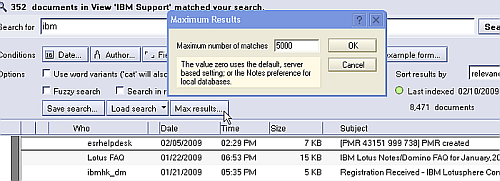
When I would search for something that I knew would produce lots of results, like Domino, I would only get 5 results. One day, I was going through and deleting some old messages, and I realized that if I deleted one of the 5 result messages, I could perform another search and another 5 would appear. Why was the 6th one hiding during the first search, and why am I only able to search 5 messages at a time. Frustrating.
Then, I clicked on the “more” twistie to expose the advanced search options, and noticed the “Max Results” button. This button only shows if your mailbox is full text indexed. I found that this was set to 5!!! I changed it to the maximum of 5000 and my mailbox searching life has been transformed. Everything works as planned now. I’m not sure how this got set to 5. I’ve even double checked our mail template didn’t have that as a default. No idea.
The hardships of enourmous mail files.
I manage an environment with over 1800 mailboxes that are greater than 2GB (including hub and cluster mate copies) and 66 above 10GB. The physical limit of a Domino database is 64GB.
However, anything beyond 2GB becomes very difficult to manage and here’s why.
1. Databases become corrupt very often.
2. Running Fixup or Compact on a weekly basis as part of Domino routine maintenance becomes problematic because the server is always running the maintenance on the databases. In fact, you’ll need to split up fixup and compact to run on specific directories during different evenings of the weeks. You may even want to run Updall on different directories different nights of the week.
3. Backups take forever and may not finish before the beginning of your work day.
4. Opening the mailboxes takes a very long time because it has to index the inbox every time you open it (if the user does not file messages to folders, which most don’t).
5. You pretty much can’t have full text indexing turned on for the server copies of the database because the full text indexing will be continuous around the clock on your server, not to mention more disk space required on server.
6. We’ve had some very strange things happen with Blackberry Enterprise Server accessing very large mailboxes. Specifically, We have had instances where a Domino server running Blackberry Enterprise Server (BES) can have frequent outages in IDTable code when working with large ID tables, which causes the server to crash. See technote titled “BES server crash in IDTable code”
7. If users have local replicas of their mailboxes, sometimes their hard drive is not large enough, sometimes the local replica becomes corrupt on the hard drive because no maintenance (fixup/compact) is ever run on it.
8. Creating new replicas onto new servers can take a week across the wire.
The list goes on.
These are real world examples of issues that I come up against every week. The best practice is to have quota policies in place that the upper management supports.
The second major thing to note here is that a proper archiving solution needs to be implemented. The local archiving that is built into Notes is often times not sufficient if you have so many enourmous mail files.
SuperAdmin Review
I posted last week about the SuperAdmin OpenNTF project. I installed it last Friday and let the agent run a while, and came in this morning to check out what it could report.
Keith Brooks commented in the last post that the ability to see the templates and ODS has been available in the Administration client since 6.5, plus the ability to modify the Administration Server (not see it). This is all true, but I still find the tool very useful for cleaning up ACL and administration server inconsistencies.
Here’s my review: Read the rest of this entry »
I'm currently

for Lotus Notes / Domino consulting engagements.
Connect with me: